

How to Find Your Neural Effect Level (NEL)

Brain.FM
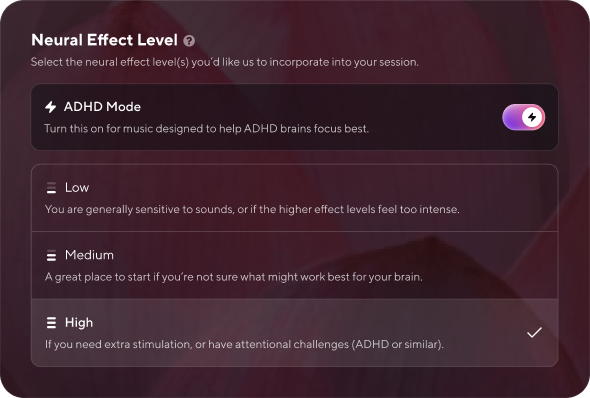
Most people treat focus music like a light switch: it's either on or off. Brain.fm works more like a dimmer. The brightness of that dimmer is your Neural Effect Level, and getting it right is the difference between music that quietly powers your work and music that either bores you or winds you up.
Here's the part most new users miss: more is not automatically better. A higher Neural Effect Level affects the brain more strongly, all else being equal, but different brains need different amounts of stimulation. Finding your Neural Effect Level is a short, structured process, and this guide walks you through it one step at a time.
What Neural Effect Level Actually Means
Brain.fm's core technology adds rhythmic modulation to music, and that modulation is what nudges your brainwaves toward a target state. On a Focus track, you can often hear it as a faint thrumming layered into the music, running at roughly "helicopter speed," the beta range associated with active concentration. (On Sleep tracks the same mechanism runs much slower, closer to "ocean wave speed.")
Neural Effect Level describes how much of that modulation is present. Practically, a higher level means the thrumming is more pronounced and the music pushes harder on your attention system. A lower level means a gentler push.
This is the one idea to hold onto: the level that helps you is the one that matches your brain's stimulation needs, not the highest number available. Heavier modulation is stronger, but stronger is only better if your brain is asking for more.
Why Your Neural Effect Level Is Personal
Attention runs partly on arousal, the brain's background level of activation. Some brains sit lower on that scale and go hunting for stimulation when a room gets quiet, which shows up as restlessness, tab-switching, and mental noise. For those brains, a higher Neural Effect Level may supply the missing input and help things settle.
Other brains already run hot. Adding more stimulation to an already over-aroused system doesn't sharpen focus, it tips you past the useful zone into agitation. For those brains, a lower level works better.
This is why Brain.fm builds in a range instead of shipping one fixed intensity. It's also why the strongest setting, which Focus exposes as ADHD Mode, is a High Neural Effect Level aimed at driving attention networks harder. That design draws on Brain.fm's own peer-reviewed research. In a 2024 study published in Communications Biology, a Nature Portfolio journal, Brain.fm's science team and Northeastern University's MIND Lab, with funding in part from the National Science Foundation, used fMRI and EEG. They found that music with rapid added modulation increased activity in the brain's attention networks and increased synchronization between brain activity and the music's rhythm. When the team varied the modulation, beta-range modulation (around 16 Hz) helped sustained attention more than other ranges for participants who reported more ADHD symptoms. In other words, brains that struggle more with attention may get more from this kind of stimulation. That is a tendency across groups, though, not a rule for every individual, which is exactly why you test.
Brain.fm is a focus tool, not a medical treatment, and it isn't a substitute for professional care. If you have or suspect ADHD, talk with a qualified healthcare provider.
How to Find Your Neural Effect Level: The Step-by-Step Test
You can find your level in a few focused sessions. Follow these steps in order.
Start from the app's calibration. When you first sign up, Brain.fm's onboarding includes a short personalization quiz that sets an initial Neural Effect Level for you. If you already breezed past it, no problem: just start from a middle setting as your baseline in the next step.
Pick one real, recurring task. Choose something you actually do most days, like answering email, writing, coding, or reviewing documents. Testing on a real task beats testing on a made-up one, because the goal is how you perform, not how the music feels in isolation.
Open Focus and set a starting level. Neural Effect Level options live in the Focus mental state, inside Music (the setting does not apply to nature soundscapes). Set a medium level as your first baseline so you have room to move up or down.
Give it a real block, not a snap judgment. Press play and work for at least 10 to 15 minutes before deciding anything. It takes a few minutes to settle into any task, so the first minute tells you very little.
Log two quick numbers. When the block ends, write down minutes of actual focused work and a focus-quality score from 1 to 10. Two numbers is enough. The point is to capture something more honest than a vague impression.
Adjust one level and repeat. Move the Neural Effect Level up or down by one step, keep everything else the same task, same time of day where possible, and run another block. Change one thing at a time so you can tell what caused what.
Try the High setting (ADHD Mode) if standard levels aren't landing. If medium and lower settings leave you drifting or restless, switch on ADHD Mode in Focus to jump to the High Neural Effect Level. For brains that need more activation to focus, this may be the setting that clicks.
Test across task types before you commit. The level that's perfect for repetitive admin may be too strong for reading or drafting, where language-heavy work competes for the same mental channel. Once you have a front-runner, confirm it on a second kind of task.
After a handful of sessions, a pattern usually shows up: one or two levels consistently produce more minutes and higher scores. That's your default. Set it, and stop fiddling.
How to Read the Thrumming (A Quick In-App Tip)
Worth knowing so a number doesn't confuse you: Brain.fm scores each track's Neural Effect Level from its first 30 seconds. Music changes over time, so the modulation later in a track can drift above or below the score you saw at the start. If a track feels different two minutes in than its label suggested, that's expected, not a glitch. Judge by how you feel and perform over the whole block, not by the opening bars.
Signs Your Neural Effect Level Is Off
You don't need a spreadsheet to notice when the level is wrong. Watch for these.
Too low for you, if you're:
Drifting, zoning out, or re-reading the same line
Reaching for your phone within a few minutes
Feeling like the music is "just there" and doing nothing
Too high for you, if you're:
Skipping tracks repeatedly
Noticing the music instead of forgetting it
Feeling more wired or agitated rather than settled
The target feeling is almost boring: the music recedes, the task comes forward, and you stop thinking about either one. When Brain.fm is working, you tend to forget it's on.
Quick Reference: Matching Level to the Moment
Your "right" level isn't permanent. Energy shifts across the day, and so can the setting that serves you.
Sluggish, foggy, or low-energy (common in the morning or post-lunch): lean toward a higher Neural Effect Level to supply activation.
Restless, anxious, or already wired: lean lower to avoid tipping into overstimulation.
Deep, repetitive execution work: a stronger level often helps you lock in.
Reading, writing, and language-heavy work: a gentler level tends to compete less with the task.
Attention feels impossible to start or hold: try ADHD Mode (High) before assuming the product isn't for you.
The Bottom Line
Finding your Neural Effect Level isn't guesswork once you treat it as a short experiment. Start from the app's calibration, pick a real task, test one level at a time over proper work blocks, log two honest numbers, and let the pattern tell you where your brain wants to sit. The whole thing takes a few sessions, and the payoff is focus that feels built-in rather than hit-or-miss.
Remember the core principle: the best level is the one matched to your brain and your moment, not the loudest one on the dial. Your attention system isn't broken when silence or a random playlist fails you. It just needs the right input, at the right strength.
Ready to find yours? Open the Focus category in Brain.fm, set a starting level, and run your first test block today. If you're not a member yet, start a free trial and let the onboarding calibrate your first Neural Effect Level for you.